Toit on an ESP32
Applications that share a device.
Write hardware applications in a high-level language. Run them in separate containers, and change one part of your system at a time.
Get started on ESP32 →Start with a button.
Connect a push button between GPIO 18 and ground on a supported ESP32 board with that pin available. This program enables the internal pull-up and waits for a press.
The example shows raw input edges; a mechanical button may bounce. Add debouncing when your application needs one event per press.
Toit’s libraries also give you access to I²C, SPI, UART, and networking. The package registry includes drivers for sensors and other peripherals.
import gpio

main:
  button := gpio.Pin 18 --input --pull-up

  try:
    while true:
      button.wait-for 0
      print "Button pressed"
      button.wait-for 1
  finally:
    button.close
The development loop
Meet Jaguar.
Jaguar is a development tool for running Toit programs on an ESP32. After installing it on your board, you can send code over your local WiFi network and restart your program without reflashing the firmware for each edit.
Follow the setup guide to connect your device, then run your saved example:
jag run button.toitThe runtime
Update an application, keep the others running.
A Toit device can run several applications in separate containers. Each has its own managed memory. Containers can communicate through services, and can be stopped and replaced independently.
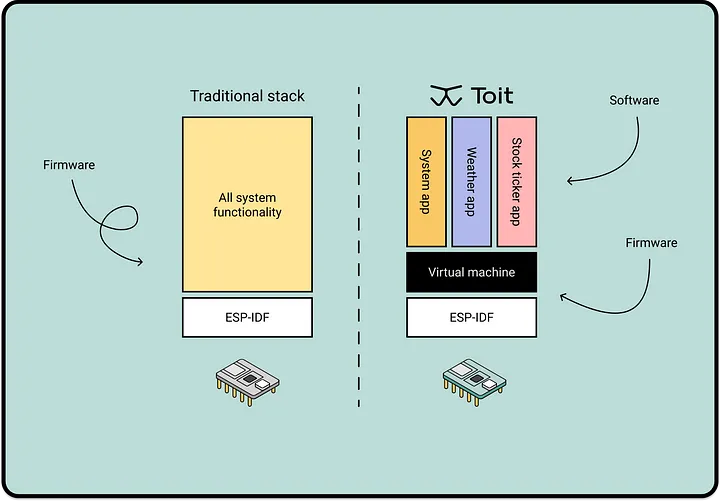
This makes it practical to experiment with one application while other parts of the device remain active, including when working with AI-generated code.
Containers isolate application memory; they do not make arbitrary code harmless. Code can still affect the peripherals and services it can access, and applications share the device’s resources.
Learn how to install and manage containers →Sensor services
Run the same application on different hardware.
toit-sensors defines common interfaces for measurements such as temperature, humidity, and pressure. Drivers implement these interfaces and expose them as services to other containers.
An application asks a temperature service for a reading. The driver handles the particular sensor, its bus, and its pin assignments. The application accesses the service instead of the hardware directly.
The same application can run unchanged on different devices, as long as each device provides the services the application needs.
Read the sensor client example →